

Tips & Tricks
Work faster in Unreal Engine
Shortcuts, workflows, and practical tricks that save you time in Unreal Engine.
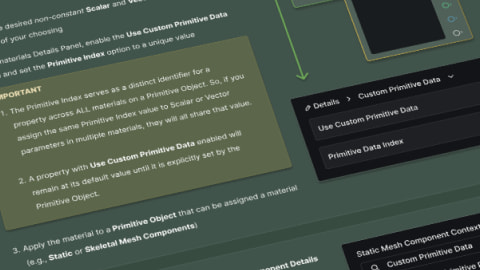
Custom Primitive Data
Use Custom Primitive Data to change scalar and vector material parameters per component without Dynamic Material Instances.
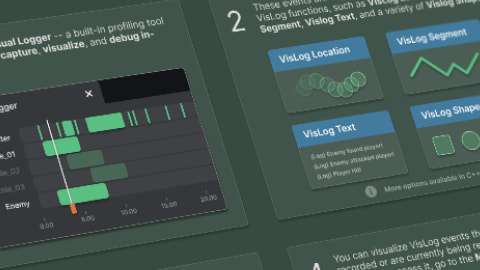
The Visual Logger
Use the Visual Logger to record, visualize, and replay in-game events for debugging.
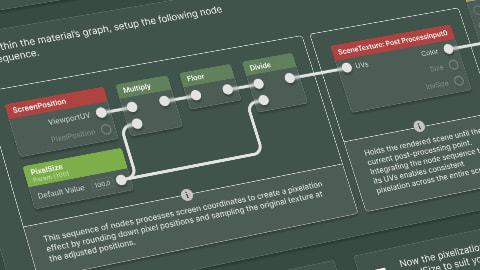
Post Process Pixelization
Create a pixelization post process material for a retro look in Unreal Engine.

The Format Text Node
Use the Format Text node to insert variable values into text for UI or debug output.

Actor Life Span
Use an actor's life span to destroy it automatically after a set number of seconds.

Direct Object Array Functions
Skip the For Each Loop and connect an object array straight to a function's Target pin.

Getter & Setter Functions
Use getter and setter functions to read and change variables owned by other objects.

The Switch Actor
Use the Switch Actor to show one of its child actors at a time.

Camera Based Masking
Use the camera's world position as a mask in your materials.

Regulate Emissive Exposure
Use the EyeAdaptation or EyeAdaptationInverse material nodes to keep emissive brightness consistent across exposure levels.

Quick Property Copy & Paste Shortcuts
Copy and paste Details panel property values with Shift + Right Click and Shift + Left Click.

Reclaim Diskspace Vault Cache
Reclaim hard drive space by clearing the Epic Games Launcher's Vault Cache.

The Vertex Interpolator Node
Move any material calculation from the pixel shader to the vertex shader with the VertexInterpolator node.

Timers and the Create Event Node
Connect a Create Event node to Set Timer by Event to call functions on any object and set timers from inside functions.

Timers
Run a function or custom event after a delay, once or on a loop, with Blueprint timers.

Temporarily Change Actor Pivot
Move an actor's pivot for a quick edit by holding Alt and middle-mouse dragging the transform gizmo.

The Math Expression Node
Type a formula into a Blueprint Math Expression node and let the editor build the node graph for you.

Named Reroutes
Replace long wires in the Material Editor with Named Reroute declaration and usage nodes.

Hide Editor Grid Lines
Turn off the background grid in the Blueprint and Material editors for a cleaner graph.

The Depth Fade Node
Soften the edges where translucent surfaces meet opaque geometry with the Depth Fade material node.

Rotate Mesh by Material
Spin a mesh on the GPU by feeding the RotateAboutAxis node into World Position Offset.

Custom Material UVs
Move texture UV math from the pixel shader to the vertex shader with the Customized UV material inputs.

Show All Redirectors
Find every redirector in your project with the Show Redirectors filter, then clean them up.

Save & Load Editor Layouts
Save your editor tab and panel arrangements as layouts and switch between them from the Window menu.

Color Picker Themes
Save reusable color swatches in the Unreal Engine color picker with color themes.

Lighting Channels
Control which lights affect which objects with Lighting Channels.

Lumen Hit Lighting Reflections
Get near ray-traced reflection quality from Lumen by switching its Ray Lighting Mode to Hit Lighting for Reflections.

The Audio Widgets Plugin
Use the AudioWidgets plugin's ready-made UMG widgets for meters, sliders, knobs, and scopes.

The Console Variables Editor Plugin
Track, toggle, and save your most used console variables as presets with the Console Variables Editor.

Call Function in Editor
Turn Blueprint functions and custom events into Details panel buttons with the Call In Editor option.

Float Is Now Double Precision
Blueprint float variables are double precision in Unreal Engine 5, and here's what that means for your project.

The Select Node
Use the Select node to return one of several values based on a Boolean, Byte, Integer, Integer64, or Enum index.

Find In Blueprints Utility
Search every Blueprint in your project for functions, events, variables, and comments with Find in Blueprints.

For Each Enumerator
Loop through every value of an enum in Blueprints with the ForEach enum node.

The Measurement Tool
Measure distances in an orthographic level viewport by dragging with the middle mouse button.

Viewport Split View Layouts
Use the Viewport Sizing menu to split the level editor into up to four viewports, then maximize and restore them.

Viewport View Mode Shortcuts
Hold Ctrl and drag with the middle mouse button to switch a level viewport between perspective and the orthographic views.

Python Foundation Packages Plugin
Enable the Python Foundation Packages plugin to have the editor pip install NumPy, SciPy, Pillow, and other common Python libraries.

Json Blueprint Utilities Plugin
Official JSON support in Blueprints via the Json Blueprint Utilities plugin.

Niagara Fluid Plugin
Enable the Niagara Fluids plugin to get grid-based gas and liquid simulation templates for Niagara.

The Actor Palette
Enable the Actor Palette plugin to drag assets from the actors of another level straight into the one you're editing.

Atmospheric Sun Rotation Shortcut
Hold Ctrl + L and move the mouse to rotate the atmosphere sun light directly in the level viewport.

Freeze Rendering
Use the FreezeRendering console command to lock visibility culling so you can fly around and inspect what the renderer culled.

The Preview Mesh
Hold Backslash to show a preview mesh under the cursor in the level viewport, and set your own preview meshes in Editor Preferences.

Set Members in Structure
Use the Set Members node to change specific variables of a structure without rebuilding it.

Print String Output Log Tagging
Add Warning: or Error: to a Print String message to color it yellow or red in the Output Log.

Show 3D Widget
Enable Show 3D Widget on Vector and Transform variables to move them with a gizmo in the level viewport.

Node Pin Drop Context
Drop variables and functions from My Blueprint onto node pins to spawn and wire them in one step.

Drag & Drop Variable Modifier Shortcuts
Hold Ctrl or Alt while dropping a variable into a Blueprint graph to place a Get or Set node without the menu.

Keep Simulation Changes
Press K during Simulate to copy the selected actors' simulated state back to the editor level.

Align Nodes Shortcut
Use the graph editor's align shortcuts to line up selected nodes by their edges or centers.

Straighten Nodes Shortcut
Select connected nodes and press Q to straighten the wires between them.

Delete and Reconnect Nodes Shortcut
Press Shift + Delete to delete Blueprint nodes and wire their execution pins back together.

Session Frontend
Record a trace from the Session Frontend's Trace Control tab and open it in Unreal Insights to find CPU and GPU bottlenecks.

Stat SceneRendering
Use the stat SceneRendering command to see render thread timings and scene counters in one readout.

Live GPU Profiler
Use the stat GPU command to watch per-pass GPU timings update live while you move through a level.

Dump GPU
Use the DumpGPU console command to save every intermediate rendering resource of a frame and inspect it in a browser.

GPU Visualizer
Use ProfileGPU and the GPU Visualizer to capture one frame of GPU work and find the most expensive passes.

Viewport Smooth Zoom
Hold Alt and drag with the right mouse button to dolly the viewport camera smoothly toward its pivot.

Change Max Framerate
Use the t.MaxFPS console variable to cap or uncap the framerate for the current session.

Switch Statements
Use Blueprint Switch nodes to route execution to a different output based on an enum, integer, string, name, or gameplay tag.

Subcategories
Nest Blueprint and C++ categories by separating category names with a vertical bar.

Object Validation
Convert an object variable's Get node into a Validated Get to branch on whether the reference is valid.

Toggle Light Radius Indicator
Press Alt + R to show or hide the light radius wireframes in the level viewport.

Spawn Point Light Shortcut
Hold L and left-click in the level viewport to place a Point Light where you click.

Blueprint Quick Pinning
Add inputs and outputs to Blueprint functions, macros, and custom events by dropping a wire onto their entry or result node.

Blueprint Function Input Variable Nodes
Read a Blueprint function's inputs as standalone Get nodes instead of running wires back to the entry node.

Declare & Define Native Gameplay Tags
Use the native gameplay tag macros to declare and define Gameplay Tags in C++.

Environment Light Mixer
Use the Env. Light Mixer to create and edit a level's sun, sky, atmosphere, cloud, and fog actors from one window.

Numeric Input Math
Type a math expression into any numeric field and Unreal Engine calculates the result for you.

Quick Replace Variable Nodes
Swap the variable on an existing Get or Set node by dropping a different variable from the My Blueprint panel onto it.

Select All Actors with the Same Static Mesh
Press Shift + E to select every Static Mesh Actor in the level that uses the same mesh as your selection.

Stat Unit
Use the stat unit and stat unitgraph console commands to show frame, thread, and GPU timings in the viewport.

Titlebar Statistics
Show the editor's frame rate, memory use, object count, and stall count in the main window with one Editor Preferences setting.

Blueprint Node Compiling Options
Use the Compile Options on impure Blueprint nodes to disable them or limit them to development builds.

Actor Snapping Shortcuts
Use the vertex, floor, and grid snapping shortcuts to line up actors in the level viewport.

The Asset Picker
Use the Open Asset picker to find, open, place, or move assets from anywhere in the editor.

Shadow Pass Switch
Use the Shadow Pass Switch material node to give a material a different result when it renders into shadows.

Dumpticks
Use the dumpticks console command to list every registered tick function in your level and see which ones are enabled.

Function Parameter Descriptions
Add per-pin tooltips to C++ and Blueprint functions with the @param and @return comment tags.

Area-Specific Color Grading
Use the Color Correction Regions plugin to color grade only what's inside a shaped region of your level.

Wire Manipulation Shortcuts
Use the Shift, Ctrl, and Alt modifiers to highlight, connect, move, and break wires in Unreal Engine graph editors.

Content Browser Quick Search
Type an asset's name while the Content Browser has focus to jump straight to it, then press Enter to open it.

Readable Structure Arrays
Use the TitleProperty metadata to show a struct member's value as the header of each array element in the Details panel.